


AutoExpreso Móvil
3.5515.00 Reviews
App Specs
- Version
- 1.0.63
- Updated On
- License
- Free
- Downloads
- 500,000+
- Developer
- Technology Partners
- Categories
- Auto & Vehicles
- Platform
- Android, iOS
Screenshots
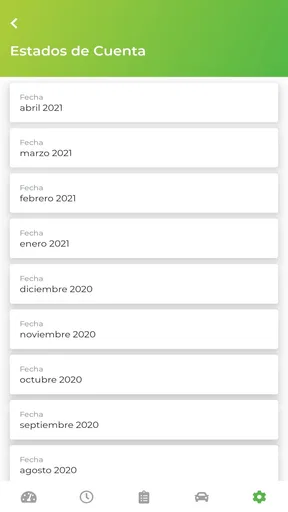
 Analysis by AppCompare
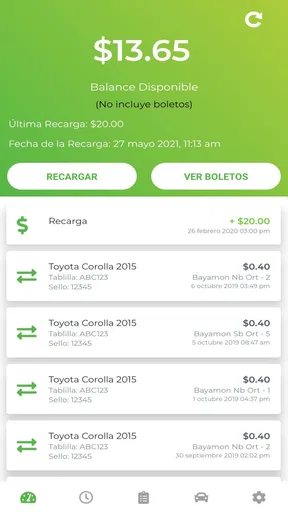
Managing a toll account is one of those jobs I would rather finish before leaving home than deal with beside a busy highway. AutoExpreso Móvil is designed for that exact situation: it puts Puerto Rico’s electronic toll account on a mobile device instead of making the website, a phone call, or a physical service point your only option. I tested it as an everyday vehicle-management tool, and my overall impression is practical rather than flashy. It is useful when you already use AutoExpreso and want a quicker way to check your account, but it is not a complete driving assistant or a replacement for every toll-related task.
The app comes from Technology Partners and is free to use, with an Everyone content rating. It belongs in the Auto & Vehicles category, and its central purpose is narrow but important: helping drivers manage an electronic toll account in Puerto Rico. That focus is a strength because the interface does not need to pretend to be a map, a fuel tracker, or a general car-maintenance platform. At the same time, anyone expecting navigation, live traffic guidance, or detailed vehicle tools will find the experience much more limited.
What I like most is the possibility of turning a repetitive account check into a small routine. Before a long drive, I can open the app, confirm that the account looks ready, and avoid relying on memory. That does not eliminate every toll-account concern, but it gives the driver a convenient place to begin. With an average rating of 3.5 from around 2.8 thousand ratings, the reception is mixed enough to suggest that convenience and reliability matter greatly here. This is an account utility, so small points of friction feel more serious than they would in a casual entertainment app.
How I use AutoExpreso Móvil in a normal driving routine
I make the app part of a simple driving routine: I check the account while parked, well before setting off, and use a separate navigation app for the route. That keeps toll-account preparation distinct from decisions on the road. For a shared vehicle, I also take a moment to confirm I am looking at the right account before making any change; next, I’ll explain how I handle the points where setup can feel less straightforward.
Start with the account, not the road
My recommended workflow begins before the vehicle moves. I open AutoExpreso Móvil when I have a stable connection, sign in if needed, and review the account information that is available to me. The important habit is to treat the app as a preparation tool rather than something to operate while driving. Checking at home or while parked is safer, faster, and less stressful than trying to solve an account problem near a toll route.
For a regular commuter, this can become a simple weekly check. I would choose a quiet moment, open the account, review the current status, and close the app once I know everything appears normal. For an occasional driver, the timing is different: checking before a trip is more useful than opening it randomly. The app becomes particularly relevant when a vehicle has not been used for a while, when a trip will involve several toll roads, or when another person may be driving the registered vehicle.
One practical insight is to separate account preparation from route planning. AutoExpreso Móvil is not a navigation replacement, so I would use a dedicated maps app for directions and keep this one focused on the toll account. Combining both roles mentally can lead to a poor decision, such as assuming that seeing account information means the app will also warn about traffic, identify every toll point, or guide you around a closure. Its value is administrative, not navigational.
Worth Reading Before You Choose

EA SPORTS FC Mobile 26 Is a Bigger Football Game, but It Takes Time

Flipboard Shows What News Apps Must Do Beyond the Feed

Switching to Android Auto Means Rethinking Your Driving Routine

Google Calendar Makes a Crowded Week Easier to Manage

Ludo King Makes the Most of the Minutes Between Plans

Baby Panda World Brings Quick Play to Modern Phones, but Its Game Library Feels Busy
A realistic everyday scenario
Imagine that I am leaving early for an appointment and expect to use toll roads. The night before, I open the app while my phone is charging. I check the account, make sure the information looks current, and note anything that needs attention. If the account requires a later action, I can handle it while I still have time rather than discovering a problem during the trip. In the morning, I use my normal navigation app for the route and keep AutoExpreso Móvil available only if I need to review the account again while parked.
This small sequence is more valuable than repeatedly opening the app without a purpose. It also reduces the temptation to interact with a phone in traffic. The app does not need to be used constantly to be useful; its best role is as a quick checkpoint before a journey and a record-keeping aid afterward.
What the first setup feels like
The first session deserves patience. Account-management apps are less forgiving when a user enters the wrong credentials or chooses an incorrect account detail, and the consequences can be more annoying than in a social or shopping app. I recommend entering information carefully, confirming the account you are working with, and avoiding rushed setup from a parking lot. If you manage more than one vehicle or account, pause to identify which one you are viewing before making changes.
That is also where I would set expectations. AutoExpreso Móvil is connected to a specific toll-account context in Puerto Rico, so its usefulness depends on actually having a relevant AutoExpreso account. A visitor who only needs directions around the island may not need it at all. A driver who uses the electronic toll system regularly is the person most likely to benefit from taking the initial setup seriously.
Settings and habits worth checking
I would begin by reviewing the basic account and notification behavior available on the device, without assuming that every phone presents the same options. The goal is not to switch on every alert automatically. It is to decide which reminders genuinely help me notice an account issue and which would simply add noise. A toll app is most useful when its messages are easy to recognize and do not get buried among unrelated notifications.
Phone-level settings matter too. I would check that notifications are not blocked, that battery restrictions are not unnecessarily aggressive, and that the app can be opened normally when I need it. These are not special AutoExpreso features; they are common causes of confusion with account apps. If the application seems quiet, I would first inspect the phone’s notification settings before assuming the account itself has changed.
Another useful habit is keeping the app available on the first screen or in a clearly named folder. That sounds minor, but it changes the workflow when I am preparing for a trip. I do not want to search through several pages while standing beside the car. A visible shortcut encourages a quick check at the right time and makes it less likely that I will postpone the task until I am already on the road.
Do not treat a notification as a complete account review. An alert can draw attention to something, but I would still open the account and read the relevant information before deciding what to do. Conversely, I would not keep refreshing the app expecting it to function like a live dashboard. The best balance is deliberate checks at sensible moments, supported by phone notifications when they are useful.
Faster patterns for repeat users
Experienced use is mostly about reducing unnecessary steps. I would create a repeatable sequence: open the app, identify the correct account, review the key account information, handle any needed action, and close it. Performing those steps in the same order makes it easier to notice when something looks different. It also prevents the common mistake of opening an account app, glancing at one screen, and assuming the entire account is fine.
For frequent toll-road users, I would pair that sequence with a calendar habit. A weekly reminder may be appropriate for someone who drives often, while an occasional traveler may only need a reminder before planned trips. The app itself does not have to carry the whole memory burden. Using the phone’s ordinary calendar or reminder tools alongside AutoExpreso Móvil creates a dependable routine without pretending that the toll app is a full personal organizer.
A second shortcut is to check the account after making a change, not only before one. If I update account information or complete an account action, I would return to the relevant screen and confirm that the result appears as expected. This is especially sensible when the change matters to an upcoming trip. A confirmation step costs little and can catch misunderstandings while I am still parked and able to correct them.
There is also a useful separation between “trip readiness” and “account maintenance.” Trip readiness is a quick pre-drive check. Account maintenance is the slower work of reviewing information and dealing with anything unusual. Mixing the two can make a quick check feel complicated. I prefer to handle maintenance at home, then use the app for a short readiness review before departure.
Where the app helps more than usual alternatives
The main alternative is handling the account through a browser, a phone conversation, or an in-person channel. Those approaches may still be preferable for complicated problems, but a mobile app is more convenient for routine checks because it is already on the device I carry. I do not need to remember a web address or find a separate computer simply to look at my account. That convenience is the clearest reason to install it.
Compared with a general navigation app, AutoExpreso Móvil is better at keeping the toll-account task separate from directions. A maps app may help me decide which roads to take, but it is not the place I would expect to manage my AutoExpreso account. Compared with a generic finance or vehicle app, this application is more directly relevant to Puerto Rico toll use, while being much less useful for fuel costs, maintenance records, parking, or route discovery.
The trade-off is that the browser or a support channel may be better when I need broader assistance or when the mobile workflow does not answer my question. I would not uninstall those alternatives just because I have the app. Instead, I would use AutoExpreso Móvil for quick account management and keep a more formal support route in mind for issues that require explanation, correction, or human help.
Limits that advanced users should understand
The app’s narrow purpose is also its biggest limitation. It does not turn the phone into a toll transponder, a navigation system, or a complete vehicle-management center. I would not install it expecting road alerts, maintenance scheduling, fuel tracking, or a detailed travel history. Those are different jobs, and adding unrelated expectations makes the app seem worse than it is.
Another limit is that mobile convenience does not guarantee that every account problem can be solved instantly. If information looks wrong, an action fails, or the account needs a more involved correction, repeated tapping is unlikely to help. My approach would be to record what I saw, try the normal corrective step once, and then move to the appropriate official support option if the issue remains. The app is a useful first stop, not a promise that every exception can be handled inside one screen.
Connectivity and phone conditions are worth considering as well. I prefer to check the account before leaving because a roadside connection may be inconsistent and because the driver should not be interacting with the phone in motion. This is a practical limitation rather than a criticism of one particular feature: any account app becomes less convenient when used at the worst possible moment.
Privacy and account security also deserve ordinary caution. I would avoid sharing login details, use the phone’s normal security protections, and sign out or lock the device appropriately if other people regularly use it. If a vehicle is shared, I would be especially careful about making changes without confirming which account and vehicle are involved. The convenience of mobile access is only helpful when the account remains under the right person’s control.
Who should install it, and who should skip it
I think AutoExpreso Móvil is a sensible choice for Puerto Rico drivers who actively manage an AutoExpreso electronic toll account and want a convenient mobile checkpoint. It is also useful for people who regularly lend a vehicle, commute on toll roads, or prefer to review account information before a journey instead of waiting for a problem to become urgent. The free price removes the usual cost barrier, and the Everyone rating makes it broadly suitable for general household use.
I would skip it if I do not use AutoExpreso, if I only need route directions, or if I am looking for a single app that handles every aspect of car ownership. I would also avoid relying on it as the only solution when an account dispute or unusual correction needs detailed support. In those cases, a browser or direct assistance may be a better fit, even if the app remains useful for ordinary checks.
Device compatibility is reasonably accessible for older phones because the minimum requirement is Android 6.0. The current version is 1.0.63, so I would still keep the app updated through the normal store process when updates are available. An update is not a guarantee that every issue disappears, but staying current is a sensible part of maintaining an account-management tool.
My verdict after building a routine around it
AutoExpreso Móvil works best when I give it a modest, clearly defined job. It helps me manage an electronic toll account in Puerto Rico, check information before driving, and keep routine account work closer at hand than a browser or support call. Its value comes from repeatability: the same short check before a trip, the same careful confirmation after an account change, and the same decision to stop using the phone once the vehicle is moving.
The experience is not perfect for every situation. The middling average rating of 3.5 reflects why expectations should stay practical: account apps are judged by clarity and trust, and any friction can be frustrating when a trip is approaching. I would not use this as a navigation tool or assume it can resolve every complex account issue. I would use it as the first layer of a broader workflow, with official alternatives available when the situation goes beyond routine management.
With over 500 thousand installs, it has clearly reached a substantial group of drivers, and that makes sense given the specific audience it serves. My recommendation is straightforward: if you already rely on AutoExpreso, install AutoExpreso Móvil, set aside a calm moment for setup, and build a pre-trip checking habit. If you do not have a relevant toll account, the app will probably add little to your phone. For the right driver, though, mobile toll-account management is a small convenience that can prevent a much more inconvenient surprise.
Pros
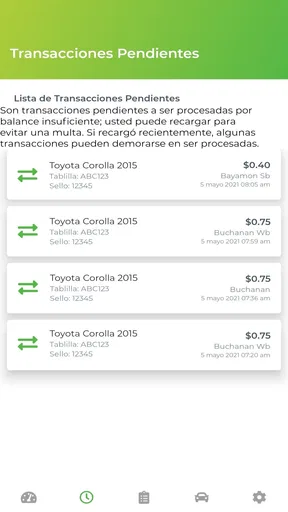
- Quickly check toll account balances and recent transactions.
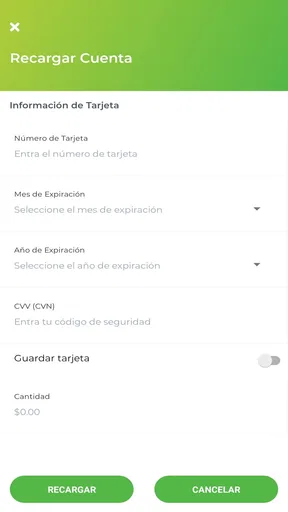
- Conveniently add funds without visiting a service center.
- Helps avoid missed payments with account status information.
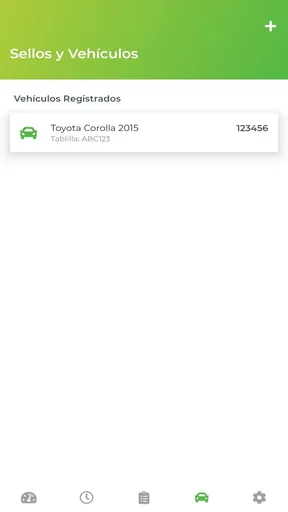
- Useful for monitoring multiple vehicle or toll-tag details.
- Available on mobile
- making account access practical while traveling.
Cons
- Requires a stable internet connection for most account functions.
- Some users may find registration and account linking confusing.
- Payment processing can occasionally take time to update.
- App usefulness depends on having an eligible AutoExpreso account.
- Notifications and support responses may not always be immediate.
FAQs for AutoExpreso Móvil
What is AutoExpreso Móvil and what can I use it for?
AutoExpreso Móvil is the official mobile companion for Puerto Rico’s AutoExpreso electronic toll system. After installing it, users can generally review their account balance, check toll activity, manage vehicles and license plates, add funds, and receive account-related information. The exact options available may depend on whether your account is registered, your vehicle is linked correctly, and the current services supported by the AutoExpreso system.
Can I use AutoExpreso Móvil to recharge my toll account?
Yes, one of the main reasons to use AutoExpreso Móvil is to manage and replenish an AutoExpreso account without visiting a service location. Depending on the available version and your account status, you may be able to make a one-time payment or configure automatic replenishment using an eligible payment method. Before confirming a transaction, carefully verify the account, vehicle, amount, and payment details.
Do I need an AutoExpreso account or transponder to use the app?
Most of the app’s useful account-management features require an existing AutoExpreso account and a vehicle or transponder associated with it. You may be able to access limited information before completing registration, but checking balances, viewing transactions, receiving alerts, or adding funds normally requires account credentials. If your transponder or license plate is not correctly linked, some information may not appear accurately.
Is AutoExpreso Móvil safe for managing personal and payment information?
AutoExpreso Móvil is designed to provide access to toll-account information and may process sensitive details such as contact information, vehicle data, account credentials, and payment information. Users should download it only from the official Google Play or Apple App Store listing, keep the application updated, use a strong unique password, and avoid entering payment details on public or unsecured networks. Always review the developer and privacy information before signing in.
What should I do if the app does not show my balance, tolls, or payment?
If AutoExpreso Móvil displays outdated information or does not show a recent payment, first check your internet connection and confirm that you are signed in to the correct account. Close and reopen the app, install any pending update, and allow reasonable processing time for transactions to appear. Do not immediately submit repeated payments. If the problem continues, save the transaction confirmation and contact official AutoExpreso customer support.


